
Introducing

Table of Contents
Your Portal
Your XpressView portal gives you access to downloadable Service and LOLER reports, as well as any Breakdown, Repair, Upgrade, and Installation works that have been completed on your assets. Additionally, you can view your pre-use check history. This provides an accessible and comprehensive asset history for you to review the status of your cranes and hoists.
Service (PUWER), LOLER, Breakdowns, and Repair, Upgrade, and Installation Reports
Our operations team should have provided you with your login details and the link to access the XpressView portal. You can also access the log-in screen via the button on our homepage: streetcranexpress.co.uk
Once logged in, the PUWER Service Reports page will be the first that you see. You can switch to LOLER by clicking the “Job Type” dropdown, then “Service”, then “LOLER”, or access the Repair, Upgrade, and Install page by clicking the matching header under “Job Type”. Scroll down to view your latest reports; you can also filter this view by contract, date, location, or job number for a more granular view of your assets.
You can download individual reports by clicking on the PDF icon, or click the green plus icon to add multiple entries to your basket. You can then download these together in a zip folder by clicking the basket icon. RAMS are accessible by clicking the icon beneath the “RAMS” column to download.
Pre-Use Checks
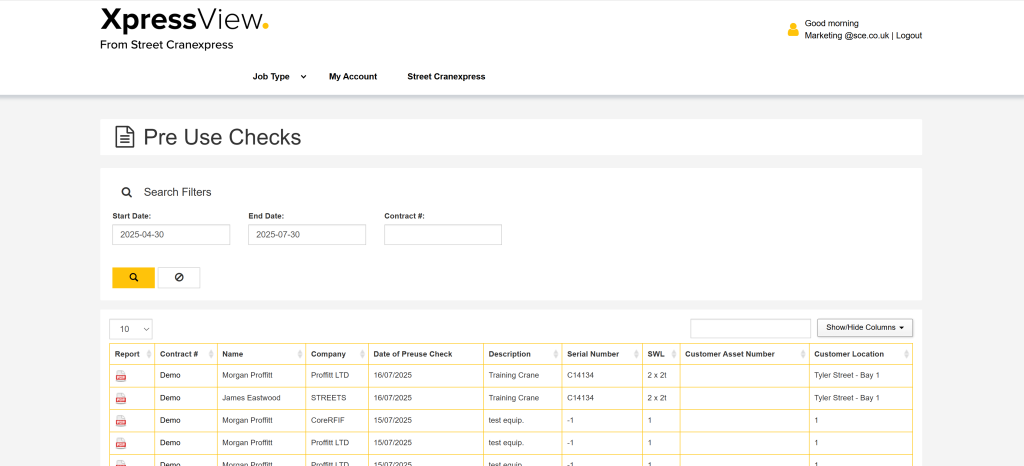
Go to “Pre-Use” under the “Job Type” header to view your asset’s pre-use check history. Here, you can download your operator’s pre-use inspections for audit or compliance purposes. Should an asset fail any element of a pre-use check, you can be automatically notified by email, you just need to provide us with the email you’d like us to use.
Asset Status
Enabling easy access to your asset's recent history and safe-to-operate status.
Once your assets have been paired to a QR code by our team, tags will be attached, usually to the pendant or remote control. The tag will include a QR code which you can scan.
Follow the QR code link using your mobile device to view your asset’s information and the previous five Street Cranexpress jobs, with instant downloadable reports.
Ensure Compliance with Pre-Use Checks
By following the QR code link, operators can complete pre-use checks. This launches a checklist form for the user to complete. The form enables the user to provide pass/fail/NA feedback to each category with an optional comments field.
If the asset passes: the completed form is archived in XpressView for auditing purposes.
If the asset fails: The user is forced to add comments to the element they have marked as a fail before submitting. You can add an escalation email to be notified of the failure by letting us know which email you’d like adding, the Street Cranexpress breakdown team is also notified.